Velocity types – Methods of defining velocity profiles
There are different methods available on the Velocity Model form (prepare > Seismic > Domain Conversion) for defining the velocity profile in model zones. These can generally be divided into two groups:
- Constant interval velocities – uniform or laterally varying - contain two corresponding implementations, the user-input driven method 'Vint from user input' and the method 'Vint from marker depth and horizon time’, also known as apparent velocity or pseudo-velocity.
- V0k methods describing velocity increase with time, using a linear function with the parameters V0 (velocity at function reference, normalized velocity) and k (velocity gradient). These functional methods capture the relation between velocity and compaction state as a depth dependent characteristic; therefore, k is sometimes referred to as ‘compaction factor’.
Each of the methods needs suitable parameter values that should be derived from careful analysis of the various sources of velocity information, such as checkshots and VSP’s, sonic logs, seismic processing velocities, and apparent velocities. This application does not provide functionality for velocity analysis. Consider using spreadsheets to carry out QC and analysis of velocity data, and derive regression parameters for the preferred axis system. Optimum parameters are those giving minimal depth residuals in the interval of interest.
The mathematics underlying the implementation refers to expressions provided in:
- Etienne Robein: Velocities, Time Imaging and Depth Imaging in Reflection Seismics – Principles and Methods. EAGE Publications, c 2003.
- David Marsden: hand-out to Training Course: A Practical Guide to Velocities and Depth Conversion.
This method assigns a constant (not time variant) interval velocity to the velocity layer.
By entering a velocity value in the ‘V’ column on the Velocity Model form you determine that this value should be used everywhere in that layer. To use laterally varying interval velocities, you need to create a 2D grid property of type ‘Velocity’ for the base surface time horizon (see Using laterally varying V0 and k). If present, it will be shown as a selectable item in the drop-down list of the ‘V’ column.
Interval velocity is the average velocity over a given interval.
This velocity profile type is probably the method most commonly used for stratified velocity fields. It assumes that a linear relation exists between depth (absolute depth, or below a compaction reference surface) and interval velocity, reflecting compaction behavior. This means that when you depth convert time objects, this generates a less 'blocky' velocity profile than when you use constant interval velocities.
The input parameters ‘V’ and ‘k’ are usually derived by regression of interval velocities against depth. In deciding on an appropriate layer breakdown it is worth considering that more layers do not mean more accurate depth conversion: thin layers can cause erroneous velocity extrapolation effects.
By entering values in the ‘V’ (in this case ‘V0’) and ‘k’ columns on the Velocity Model form, you determine that these parameters should be used everywhere. To use laterally varying parameters you need to create 2D grid properties of type ‘Velocity’ or ‘k’ for the base surface time horizon (see Using laterally varying V0 and k). If present, they will show as selectable items in the drop-down lists of the ‘V’ and ‘k’ columns.
Instantaneous velocity (Vinst) is the velocity at a specific point at depth z within a given interval. The linear function describes how Vinst varies over the interval as z changes in relation to gradient k. Vinst can also be described as the rate of change of depth with time over a given interval. Using this function, instantaneous velocity at a specific depth point within the interval can be estimated.
This method can capture large-scale vertical trends in instantaneous velocity in a simple function. It is used in sequences where large-scale vertical velocity trends occur related to lithology variations and compaction effects are subordinate (e.g. with large-scale shallowing upward cycles from shale to carbonate). Accordingly, this method is usually referenced to the upper velocity layer (TVD value of base of upper velocity layer or base surface of the upper velocity layer).
The input parameters ‘V’ and ‘k’ are usually derived by regression of instantaneous velocities (e.g. form integrated sonic logs) against depth. V0 is usually fixed while k may be varied as a function of interval thickness.
By entering values in the ‘V’ (in this case ‘V0’) and ‘k’ columns on the Velocity Model form you determine that these parameters should be used everywhere. To use laterally varying parameters you need to create 2D grid properties of type ‘Velocity’ or ‘k’ for the base surface time horizon (see Using laterally varying V0 and k). If available, they will show as selectable items in the drop-down lists of the ‘V’ and ‘k’ columns.
Average velocity describes the velocity gradient from ground level or seafloor (mudline) to base interval, and can only be used (in the application) for the overburden or as a second layer below a water layer.
V0k functions predicting average velocity are used in monotonous compacting clastic sediments, i.e. where lithologies with exotic velocities are absent or confined to thin intervals with little variation in thickness. Under these circumstances it is appropriate to use a single velocity layer from surface to deepest target or top overpressures.
The input parameters ‘V’ and ‘k’ are derived by regression of average velocities against depth, e.g. analyzing checkshot/VSP data.
By entering values in the ‘V’ (in this case ‘V0’) and ‘k’ columns on the Velocity Model form you determine that these parameters should be used everywhere. To use laterally varying parameters you need to create 2D grid properties of type 'Velocity' or ‘k’ for the base surface time horizon (see Using laterally varying V0 and k). If available, they will show as selectable items in the drop-down lists of the ‘V’ and ‘k’ columns.
click to enlarge
This method is applicable under the same conditions as the V0kz method above but has two advantages over it. Firstly, actual checkshot/VSP data covering large depth intervals frequently show a more linear behavior in Vavg-time graphs than in Vavg-depth graphs. Secondly, the V0 and k parameters in Vavg-time systems correspond directly to the A and B terms in second order t-d regressions forced through 0.
The input parameters ‘V’ and ‘k’ can be derived directly by regression of average velocities against 2-way time or indirectly from the A and B terms of second order functions in time-depth, e.g., analyzing checkshot/VSP data.
By entering values in the ‘V’ (in this case ‘V0’) and ‘k’ columns on the Velocity Model form you determine that these parameters should be used everywhere. To use laterally varying parameters you need to create 2D grid properties of type 'Velocity’ or ‘k’ for the base interval time horizon (see Using laterally varying V0 and k). If available, they will show as selectable items in the drop-down lists of the ‘V’ and ‘k’ columns.
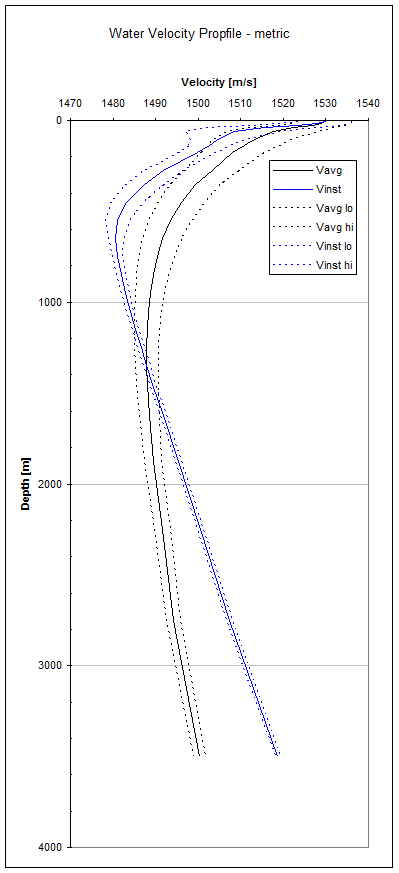
If you are dealing with an offshore project, then consider using the ‘Water Velocity Profile Avg’ method, which makes use of water velocity lookup tables. Water velocity is primarily a function of depth, temperature, and salinity. The implementation in the application is based on velocities derived with the McKenzie (1981) function from temperature and salinity data collected globally in marine continental slope settings by the US Navy.
When using the option ‘Water Velocity Profile Avg’ you can scale the lookup of velocities between minimum and maximum by entering values between -1 and 1 in the table column 'Water Velocity Profile Factor', where:
-1 = slowest water velocity profile;
0 = average water velocity profile, and
1 = fastest water velocity profile.
Based on the value you enter, the table values are weighted. For example, when you enter 0.5, the average of the values of Vavg and Vmax will be taken.
Water velocity lookup table (McKenzie, 1981)
Depth (m) Vmin (m/s) Vavg (m/s) Vmax (m/s)
10 1523.455093 1529.947131 1536.004771
20 1521.31012 1528.865253 1535.830658
30 1518.09715 1527.01077 1535.111888
50 1511.674304 1522.372961 1531.988788
75 1506.751893 1517.755727 1527.690542
100 1504.486452 1514.779931 1524.143077
125 1503.222924 1512.667245 1521.309104
150 1502.291347 1510.982055 1518.971102
200 1500.535853 1508.169906 1515.238452
250 1498.67192 1505.6637 1512.174616
300 1496.748089 1503.339679 1509.506759
400 1493.249094 1499.320965 1505.041985
500 1490.437068 1496.048488 1501.361979
600 1488.395994 1493.525277 1498.398848
700 1487.020687 1491.671507 1496.099626
800 1486.116166 1490.336617 1494.360037
900 1485.533541 1489.392453 1493.074648
1000 1485.184334 1488.741897 1492.139222
1100 1485.007337 1488.313953 1491.473993
1200 1484.964375 1488.060265 1491.021101
1300 1485.032475 1487.946965 1490.736221
1400 1485.18968 1487.947962 1490.589478
1500 1485.418645 1488.041803 1490.555573
1750 1486.234661 1488.582286 1490.835394
2000 1487.293694 1489.43051 1491.484068
2500 1489.805336 1491.643607 1493.41447
3000 1492.585047 1494.237113 1495.832328
4000 1498.882736 1500.277174 1501.628083
 Vint from Marker Depth and Horizon Time – ‘Apparent Velocities’
This method is an automated implementation of the 'Vint from user input' with laterally varying interval velocity. For pairs of time horizons and depth markers, time values are extracted from horizons at the location of well markers. Interval velocities are then calculated and stored with the respective well marker, and interpolated between well markers using a user-defined method, to obtain complete area coverage.
It is appropriate for cases with either little structural relief, and thus little difference in compaction state, and cases with comprehensive well control, i.e. where forward modeling of velocity is not necessary.
Precondition for using this method is that markers and horizons represent the same geological events, i.e. the need to have identical names in the JewelExplorer. Calculated interval velocities are stored as velocity properties with the respective markers and can be QC’ed by selecting this marker property in the JewelExplorer.
If you want to use other interpolation methods or parameters other than those built into the automated option then you can do so with the Property Calculator.